Types of Laptop Chargers Explained: A Complete Beginner Guide
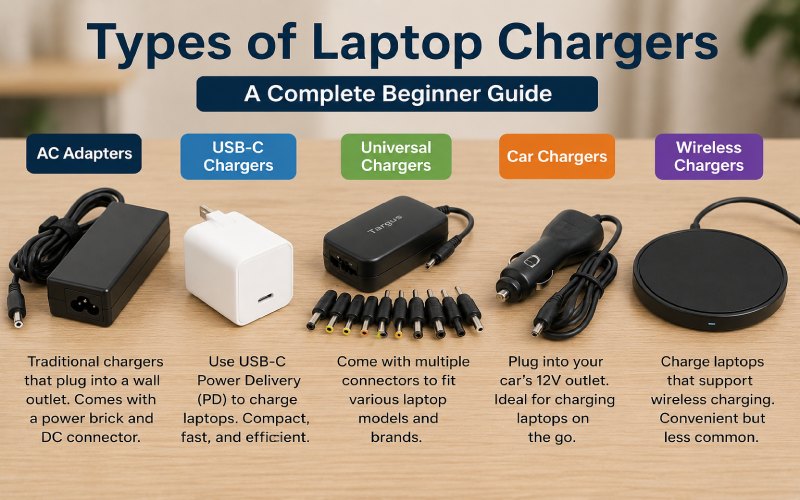
Not all laptop chargers are the same. Different laptop brands and models require specific chargers based on connector type, voltage, wattage, and charging technology. Using the wrong charger can result in slow charging, battery damage, or even hardware issues.
Whether you’re buying a replacement charger or simply want to understand the differences, this guide explains the most common types of laptop chargers, how they work, and how to choose the right one.
Table of Contents
- Different Types of Laptop Chargers
- AC Adapter
- USB-C Laptop Charger
- Universal Laptop Charger
- Car Laptop Charger
- Wireless Laptop Charger
- How to Choose the Right Laptop Charger
- Frequently Asked Questions
- Conclusion
Different Types of Laptop Chargers
Laptop chargers come in several types, each designed for different devices and charging needs. Understanding these options helps you select the safest and most compatible charger for your laptop.
1. AC Adapter
The AC adapter is the traditional laptop charger used by most laptops. It plugs into a wall outlet and converts alternating current (AC) into direct current (DC), which powers your laptop and charges its battery.
Features
- Reliable and widely available
- Converts AC power into DC power
- Available in different wattages, typically 45W to 90W
- Gaming laptops may require 120W, 180W, or higher
- Usually designed for specific laptop brands and models
How It Works
The adapter connects to a wall socket and your laptop’s charging port. It supplies the correct voltage and current required for safe charging while allowing you to use the laptop at the same time.
2. USB-C Laptop Charger
USB-C chargers have become the new standard for many modern laptops. They are compact, lightweight, and capable of delivering fast charging through USB Power Delivery (USB-PD).
Features
- Small and portable design
- Fast charging up to 100W or more on supported devices
- Can charge laptops, smartphones, tablets, and other USB-C devices
- Supports USB Power Delivery technology
How It Works
A USB-C charger connects to the laptop through its USB-C charging port. The charger automatically negotiates the required power level, making charging both efficient and safe.
3. Universal Laptop Charger
A universal laptop charger is designed to work with multiple laptop brands. These chargers usually include interchangeable connector tips and adjustable power settings.
Features
- Compatible with many laptop brands
- Includes multiple charging tips
- Adjustable voltage or wattage on some models
- Ideal as a backup or travel charger
How It Works
Choose the connector tip that matches your laptop, connect it to the charger, and plug it into your device. The charger delivers the appropriate power based on your laptop’s requirements.
4. Car Laptop Charger
A car laptop charger allows you to charge your laptop while traveling. It connects to your vehicle’s 12V power outlet, making it useful for road trips and business travel.
Features
- Portable and travel-friendly
- Charges laptops while driving
- Useful when a wall outlet isn’t available
- Available for both standard and USB-C laptops
How It Works
The charger plugs into your car’s power outlet and converts the vehicle’s power into the voltage required by your laptop.
5. Wireless Laptop Charger
Wireless charging is still relatively new for laptops, but a few premium models support it. Instead of using cables, these chargers transfer power through electromagnetic induction.
Features
- Cable-free charging
- Cleaner and more organized workspace
- Easy to use
- Limited compatibility
How It Works
Place the compatible laptop on a wireless charging pad. Energy is transferred wirelessly from the charging pad to the laptop’s battery.
How to Choose the Right Laptop Charger
Before purchasing a charger, consider the following:
- Check your laptop’s voltage and wattage requirements.
- Make sure the connector matches your laptop’s charging port.
- Buy chargers from trusted brands.
- If your laptop supports USB-C Power Delivery, choose a certified USB-C charger.
- Avoid low-quality chargers that may damage your battery or motherboard.
Frequently Asked Questions
What type of charger do HP laptops use?
Many newer HP laptops use USB-C chargers with Power Delivery, while older models often use traditional barrel-pin AC adapters. Always check your laptop model before buying a replacement.
Can I use a different charger for my laptop?
Yes, but only if it matches your laptop’s voltage, wattage, and connector type. Using an incompatible charger may cause charging problems or hardware damage.
Are USB-C laptop chargers universal?
USB-C chargers are becoming increasingly universal, but not every USB-C charger provides enough power for every laptop. Always check the wattage supported by both the charger and your laptop.
Is a universal laptop charger safe?
A high-quality universal charger is generally safe when used with the correct connector and power settings. Cheap or uncertified chargers should be avoided.
Conclusion
Choosing the right laptop charger is essential for both performance and battery health. Whether you use a traditional AC adapter, a modern USB-C charger, a universal charger, or a car charger, always ensure it meets your laptop’s specifications.
Using a compatible charger not only keeps your laptop powered but also helps extend its lifespan and prevents unnecessary hardware damage. Before buying a replacement charger, check your laptop’s model, charging port, voltage, and wattage to ensure the best compatibility.

You may also like ...