The Difference Between Software and Application Explained
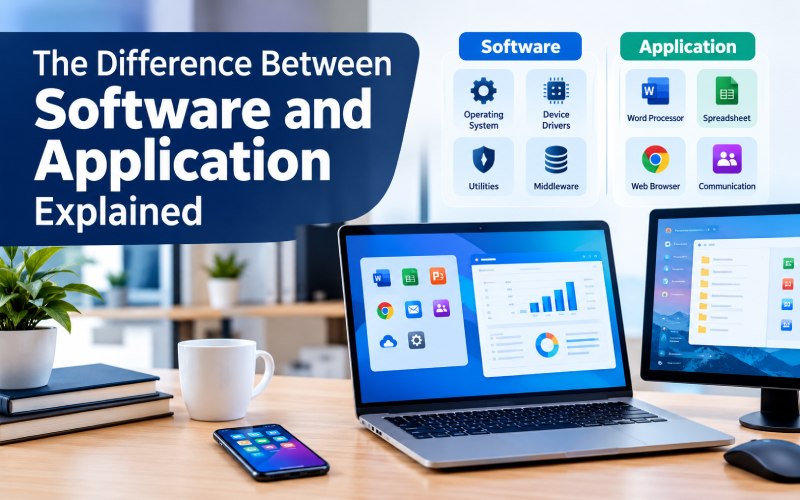
Software and applications are essential to almost everything we do on computers, smartphones, and other digital devices. People use them to create documents, browse the internet, communicate with others, manage businesses, and perform complex technical tasks.
Although the words software and application are often used interchangeably, they do not mean exactly the same thing. Software is the broader category, while an application is a particular type of software designed to help users complete specific tasks.
Understanding the difference between software and applications makes it easier to choose suitable tools, plan technology projects, and understand how digital systems work.
What Is Software?
Software is a collection of instructions, programs, and related data that tells a computer or digital device what to do. It allows hardware to perform operations, process information, and support different activities.
Unlike physical computer components, software is intangible. Users interact with it through interfaces, commands, and automated processes.
Common examples of software include:
- Operating systems such as Windows, macOS, and Linux.
- Device drivers that help an operating system communicate with hardware.
- Security utilities that detect malware.
- Programming tools used to develop other programs.
- Applications such as web browsers, spreadsheets, and image editors.
Software can run in the background, manage computer resources, support developers, or provide features that people use directly.
Main Types of Software
Software can be divided into several categories based on its purpose.
1. System software
System software manages computer resources and provides the environment in which other programs operate. Operating systems and many device drivers fall into this category.
2. Application software
Application software helps users complete particular tasks, such as writing documents, editing images, managing finances, or communicating online.
3. Programming software
Programming software helps developers create, test, debug, and maintain programs. Examples include code editors, compilers, and integrated development environments.
4. Middleware
Middleware connects different software components or systems so they can communicate and exchange information.
These categories show that software includes much more than the applications people open every day.
What Is an Application?
An application, often called an app, is a type of software designed to help users perform one or more specific tasks. Applications typically provide features and interfaces that make those tasks easier to complete.
For example, a spreadsheet application helps users organize information and calculate figures, while a photo-editing application provides tools for changing images.
Applications are available on computers, smartphones, tablets, and web browsers. Some work offline, while others rely on internet connections or cloud services.
Common examples include:
- Word processors for creating documents.
- Web browsers for accessing websites.
- Messaging apps for communication.
- Accounting applications for financial management.
- Design tools for creating graphics.
- Business applications for managing customers and operations.
Applications may be designed for individual users, specialized professional work, or large organizations.
Main Types of Applications
1. Desktop applications
Desktop applications are installed on computers and run through an operating system. Examples include desktop document editors, video editors, and accounting programs.
2. Web applications
Web applications are accessed through a browser. Examples include online document editors, webmail platforms, and browser-based project management tools.
3. Mobile applications
Mobile applications are designed for smartphones and tablets. They may provide messaging, navigation, shopping, banking, or entertainment features.
4. Enterprise applications
Enterprise applications support organizational processes such as accounting, inventory management, human resources, and customer relationship management.
5. Cloud-based applications
Cloud-based applications use remote servers to provide some or all of their functionality. They often allow users to access data and features across multiple devices.
These categories can overlap. For example, a business application may be available as both a web application and a mobile app.
Software vs. Application: Key Differences
The main difference is that software is the broad term for computer programs and instructions, whereas an application is software designed to help users perform particular tasks.
| Feature | Software | Application |
|---|---|---|
| Meaning | Broad category of computer programs and instructions | A type of software focused on user tasks |
| Purpose | Can manage hardware, support development, or perform user tasks | Helps users accomplish specific activities |
| Examples | Operating systems, drivers, programming tools, applications | Browsers, word processors, mobile apps |
| User interaction | May operate in the background | Usually offers features directly to users |
| Dependency | May provide the foundation other programs rely on | Usually depends on system software |
| Scope | Includes multiple categories of programs | Represents one category within software |
| Installation | Depends on the type of software | May be installed locally or accessed online |
The distinction is important because an application is not separate from software. Every application is software, but not every type of software is an application.
Practical Examples of Software and Applications
Looking at familiar examples makes the difference easier to understand.
Example 1: Operating System vs. Word Processor
An operating system manages memory, processes, files, and hardware resources. It provides the environment that applications need to run.
A word processor, in contrast, allows users to create, edit, and format documents.
The operating system is system software, while the word processor is application software.
Example 2: Device Driver vs. Photo Editor
A device driver helps the operating system communicate with compatible hardware, such as a printer or graphics device.
A photo editor lets users crop images, adjust colors, and apply visual effects.
Both are software, but they serve different purposes.
Example 3: Programming Tool vs. Messaging App
A programming tool helps developers write and test code. A messaging application helps people exchange messages and files.
The programming tool supports software development, while the messaging app focuses on communication.
Example 4: Cloud Platform vs. Business Application
A cloud platform can provide computing resources, storage, and services used to run digital products.
A business application may use those resources to manage orders, customer information, or financial records.
The platform supports the underlying environment, while the application provides task-specific functionality.
Key Features of Software
Software can have many different capabilities depending on its purpose and design. Common characteristics include the following.
Functionality
Software performs defined operations, from managing computer resources to processing business information.
Compatibility
Software must be compatible with the operating system, hardware, or environment in which it runs.
Security
Appropriate security measures can help protect programs and data from unauthorized access and known vulnerabilities.
Maintenance and Updates
Updates may fix defects, improve performance, add features, or address security issues.
Integration
Many software products connect with other systems through APIs, shared data formats, or other integration methods.
Scalability
Some software can be expanded to support more users, larger workloads, or additional capabilities.
Not every software product includes all these features. The relevant requirements depend on what the software is designed to do.
Key Features of Applications
Applications are generally built around user tasks and workflows. Their common features may include:
User Interface
An interface helps users navigate features, enter information, and complete tasks.
Task-Specific Functionality
Applications provide capabilities suited to their purpose, such as editing documents, analyzing data, or managing customers.
Device Compatibility
Applications may support desktop computers, smartphones, tablets, or multiple platforms.
Data Handling
Many applications create, process, store, or retrieve information needed for their functions.
Notifications and Collaboration
Depending on the application, users may receive alerts, share files, or work with other people in real time.
Customization
Some applications let users change settings, permissions, layouts, or workflows to suit their needs.
The features available depend on the application and its intended audience.
Benefits of Software
Software provides the foundation for modern computing and helps people and organizations perform tasks that would otherwise require substantial manual effort.
1. Automation
Software can automate repetitive processes, reducing manual work and helping organizations complete tasks consistently.
2. Data Management
Software supports storing, processing, searching, and analyzing information.
3. Communication
Different software systems allow devices, applications, and users to exchange information.
4. Operational Efficiency
Well-designed software can simplify workflows, reduce duplication, and support more efficient use of resources.
5. Integration
Software can connect different tools and systems, allowing information to move between departments or services.
6. Support for Innovation
Development tools and software platforms enable the creation of new applications, digital services, and business models.
Benefits of Applications
Applications provide more direct benefits to the people using them for particular tasks.
1. Easier Task Completion
Applications bring relevant features together in one interface, making tasks easier to perform.
2. Increased Productivity
Document editors, spreadsheets, communication tools, and project management applications help users organize their work.
3. Accessibility
Web and mobile applications can make services available across supported devices and locations.
4. Improved Customer Experience
Businesses can use applications to offer online booking, account management, order tracking, and customer support.
5. Better Collaboration
Applications that support shared documents, messaging, and task management help teams coordinate their work.
6. Flexible Workflows
Some applications allow users to customize settings, automate tasks, or connect other services to suit their needs.
Disadvantages and Limitations
Software and applications also have limitations that should be considered before adoption.
Cost
Commercial products may involve licensing fees, subscriptions, implementation expenses, and ongoing maintenance.
Security Risks
Software can contain vulnerabilities. Applications may also expose personal or business information if permissions and security controls are poorly managed.
Compatibility Issues
Some programs work only with specific operating systems, devices, or hardware configurations.
Maintenance Requirements
Software often requires updates, monitoring, and technical support to remain secure and reliable.
Learning Curve
Complex tools may require training before users can use them effectively.
Internet Dependency
Web and cloud-based applications may require reliable internet access for their main features, although some provide limited offline functionality.
Choosing software that fits your needs and maintaining it properly can help reduce these challenges.
When Should You Choose General Software or a Specific Application?
The right choice depends on the problem you want to solve.
Choose System or Infrastructure Software When:
- You need to manage operating systems or hardware resources.
- You are building or maintaining a computing environment.
- You need tools for development, security, or system administration.
- You need to connect technical components or services.
Choose an Application When:
- You need to create documents or spreadsheets.
- You want to communicate with customers or colleagues.
- You need to manage orders, finances, or customer records.
- You want to provide a digital service through a website or mobile device.
- You need a tool designed around a particular workflow.
In practice, most organizations use both system-level software and applications. Applications depend on underlying software, and the two work together to deliver the desired result.
How to Choose the Right Software or Application
Before selecting a tool, identify the task it needs to perform and the requirements it must meet.
- Define your goal: Decide which problem you need to solve.
- Identify essential features: Focus on capabilities that support your actual workflow.
- Check compatibility: Confirm support for your devices, operating systems, and existing systems.
- Compare costs: Consider licenses, subscriptions, implementation, training, and maintenance.
- Evaluate security: Review update policies, permissions, data protection, and access controls.
- Test usability: Try a demo or free trial when available.
- Review integration options: Check whether the product works with your other tools.
- Plan for future needs: Consider whether the solution can adapt as your requirements change.
For businesses, involve the people who will use the system in the selection process. Their feedback can help reveal practical requirements that might otherwise be overlooked.
Frequently Asked Questions
Is software the same as an application?
No. Software is the broad category that includes system software, programming tools, utilities, and applications. An application is a type of software designed to help users perform specific tasks.
Is every application software?
Yes. Every application is software, but software also includes programs that are not applications, such as operating systems and many device drivers.
Is Windows software or an application?
Windows is an operating system and is generally classified as system software. It manages computer resources and provides the environment in which many applications run.
Is Google Chrome software or an application?
Google Chrome is both software and an application. More specifically, it is application software designed for browsing websites and accessing web content.
What is the difference between system software and application software?
System software manages hardware and core computer operations. Application software provides features that help users complete tasks such as editing documents, browsing the web, or managing business information.
Can an application work without system software?
Applications generally depend on an operating system or another suitable software environment. They cannot operate independently of the underlying platform and resources they require.
Which is more important: software or applications?
Neither is more important in every situation. System software provides the foundation for computing, while applications help users accomplish specific tasks. Most digital devices require both to deliver useful functionality.
Conclusion
The difference between software and applications comes down to their scope and purpose. Software includes the broad range of programs and instructions that make digital devices function, while applications are designed to help users perform specific tasks.
Operating systems, device drivers, and programming tools illustrate different types of software. Browsers, document editors, mobile apps, and business platforms are examples of application software.
Understanding this relationship helps individuals and businesses choose suitable tools, plan technology investments, and understand how digital systems work together. The best solution is one that meets your requirements, works reliably with your existing environment, and provides appropriate security and long-term value.

You may also like ...